

#######################
Kubernetes has several components:
etcd – A highly available key-value store for shared configuration and service discovery.
flannel – An etcd backed network fabric for containers.
kube-apiserver – Provides the API for Kubernetes orchestration.
kube-controller-manager – Enforces Kubernetes services.
kube-scheduler – Schedules containers on hosts.
kubelet – Processes a container manifest so the containers are launched according to how they are described.
kube-proxy – Provides network proxy services.
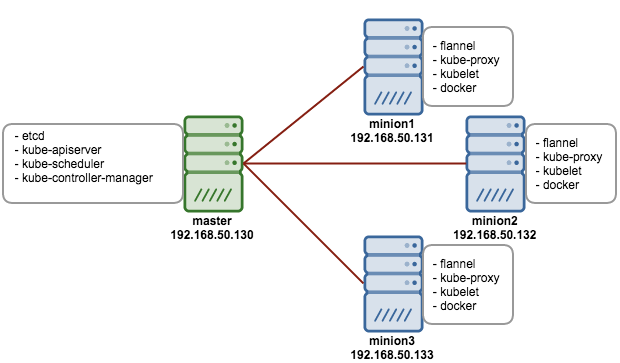
To do this setup make sure you have vagrant and virtual box installed on your machine, If you are windows guy use gitbash
###################
mkdir -p setup/{master,node1}
For Master setup
cd master
vagrant init centos/7
vim Vagrantfile
config.vm.network “private_network”, ip: “192.168.33.10”
vagrant up
vagrant ssh
Master
yum -y install ntp && systemctl start ntpd && systemctl enable ntpd
setenforce 0;systemctl disable iptables-services firewalld;systemctl stop iptables-services firewalld
vim /etc/yum.repos.d/virt7-docker-common-release.repo
[virt7-docker-common-release]
name=virt7-docker-common-release
baseurl=http://cbs.centos.org/repos/virt7-docker-common-release/x86_64/os/
gpgcheck=0
[root@master ~]# yum -y install –enablerepo=virt7-docker-common-release kubernetes etcd flannel
#########################
Open new tab
[root@master ~]# openssl genrsa -out /tmp/serviceaccount.key 2048
Generating RSA private key, 2048 bit long modulus
……………………………………………………………………………………….+++
……………………….+++
e is 65537 (0x10001)
[root@master ~]# vim /etc/kubernetes/config
KUBE_LOGTOSTDERR=”–logtostderr=true”
KUBE_LOG_LEVEL=”–v=0″
KUBE_ALLOW_PRIV=”–allow-privileged=false”
KUBE_MASTER=”–master=http://192.168.33.10:8080″
KUBE_CONTROLLER_MANAGER_ARGS=”–service_account_private_key_file=/tmp/serviceaccount.key”
[root@master ~]# vim /etc/kubernetes/apiserver
KUBE_API_ADDRESS=”–address=0.0.0.0″
KUBE_API_PORT=”–port=8080″
KUBELET_PORT=”–kubelet-port=10250″
KUBE_ETCD_SERVERS=”–etcd-servers=http://127.0.0.1:2379″
KUBE_SERVICE_ADDRESSES=”–service-cluster-ip-range=10.254.0.0/16″
KUBE_ADMISSION_CONTROL=”–admission-control=NamespaceLifecycle,NamespaceExists,LimitRanger,SecurityContextDeny,ServiceAccount,ResourceQuota”
KUBE_API_ARGS=”–service_account_key_file=/tmp/serviceaccount.key”
[root@master ~]# vim /etc/kubernetes/controller-manager
KUBE_CONTROLLER_MANAGER_ARGS=”–service_account_private_key_file=/tmp/serviceaccount.key”
[root@master ~]# vim /etc/etcd/etcd.conf
ETCD_NAME=default
ETCD_DATA_DIR=”/var/lib/etcd/default.etcd”
ETCD_LISTEN_CLIENT_URLS=”http://0.0.0.0:2379″
ETCD_ADVERTISE_CLIENT_URLS=”http://localhost:2379″
[root@master ~]# for SERVICES in etcd kube-apiserver kube-controller-manager kube-scheduler; do
systemctl restart $SERVICES
systemctl enable $SERVICES
systemctl status $SERVICES
done
[root@master ~]# netstat -tlpn
Active Internet connections (only servers)
Proto Recv-Q Send-Q Local Address Foreign Address State PID/Program name
tcp 0 0 127.0.0.1:2380 0.0.0.0:* LISTEN 1046/etcd
tcp 0 0 0.0.0.0:111 0.0.0.0:* LISTEN 1/systemd
tcp 0 0 0.0.0.0:22 0.0.0.0:* LISTEN 1050/sshd
tcp 0 0 127.0.0.1:25 0.0.0.0:* LISTEN 2230/master
tcp6 0 0 :::10252 :::* LISTEN 590/kube-controller
tcp6 0 0 :::111 :::* LISTEN 1/systemd
tcp6 0 0 :::8080 :::* LISTEN 2268/kube-apiserver
tcp6 0 0 :::22 :::* LISTEN 1050/sshd
tcp6 0 0 ::1:25 :::* LISTEN 2230/master
tcp6 0 0 :::6443 :::* LISTEN 2268/kube-apiserver
tcp6 0 0 :::2379 :::* LISTEN 1046/etcd
tcp6 0 0 :::10251 :::* LISTEN 579/kube-scheduler
[root@master ~]# etcdctl mk /atomic.io/network/config ‘{“Network”:”172.17.0.0/16″}’
For Minion setup
cd ../node1
vagrant init centos/7
vim Vagrantfile
config.vm.network “private_network”, ip: “192.168.33.11”
vagrant up
vagrant ssh
yum -y install ntp && systemctl start ntpd && systemctl enable ntpd
setenforce 0;systemctl disable iptables-services firewalld;systemctl stop iptables-services firewalld
vim /etc/yum.repos.d/virt7-docker-common-release.repo
[virt7-docker-common-release]
name=virt7-docker-common-release
baseurl=http://cbs.centos.org/repos/virt7-docker-common-release/x86_64/os/
gpgcheck=0
[root@node1 ~]# yum -y install –enablerepo=virt7-docker-common-release kubernetes flannel
[root@node1 ~]# vim /etc/kubernetes/kubelet
KUBELET_ADDRESS=”–address=0.0.0.0″
KUBELET_PORT=”–port=10250″
KUBELET_HOSTNAME=”–hostname-override=192.168.33.11″
KUBELET_API_SERVER=”–api-servers=http://192.168.33.10:8080″
KUBELET_ARGS=”–cluster-dns=10.254.254.254 –cluster-domain=cluster.local”
[root@node1 ~]# for SERVICES in kube-proxy kubelet docker flanneld; do
systemctl restart $SERVICES
systemctl enable $SERVICES
systemctl status $SERVICES
done
[root@node1 ~]# netstat -tlpn
Active Internet connections (only servers)
Proto Recv-Q Send-Q Local Address Foreign Address State PID/Program name
tcp 0 0 0.0.0.0:111 0.0.0.0:* LISTEN 1/systemd
tcp 0 0 0.0.0.0:22 0.0.0.0:* LISTEN 1504/sshd
tcp 0 0 127.0.0.1:25 0.0.0.0:* LISTEN 2269/master
tcp 0 0 127.0.0.1:10248 0.0.0.0:* LISTEN 8852/kubelet
tcp 0 0 127.0.0.1:10249 0.0.0.0:* LISTEN 8183/kube-proxy
tcp6 0 0 :::10255 :::* LISTEN 8852/kubelet
tcp6 0 0 :::111 :::* LISTEN 1/systemd
tcp6 0 0 :::22 :::* LISTEN 1504/sshd
tcp6 0 0 ::1:25 :::* LISTEN 2269/master
tcp6 0 0 :::4194 :::* LISTEN 8852/kubelet
tcp6 0 0 :::10250 :::* LISTEN 8852/kubelet
Master
[root@master ~]# mkdir pods
[root@master ~]# cd pods
[root@master pods]# vim mysql.yaml
apiVersion: v1kind: Podmetadata: name: mysql labels: name: mysqlspec: containers: - resources: limits : cpu: 1 image: mysql name: mysql env: - name: MYSQL_ROOT_PASSWORD # change this value: yourpassword ports: - containerPort: 3306 name: mysql[root@master pods]# kubectl create -f mysql.yaml
pod “mysql” created
[root@node1 ~]# kubectl get pods
NAME READY STATUS RESTARTS AGE
mysql 0/1 ContainerCreating 0 1m
[root@node1 ~]# kubectl get pods
NAME READY STATUS RESTARTS AGE
mysql 1/1 Running 0 4m
[root@master pods]# vim mysql-service.yaml
apiVersion: v1
kind: Service
metadata:
  labels:
    name: mysql
  name: mysql
spec:
  externalIPs:
    - 192.168.50.132
  ports:
    # the port that this service should serve on
    - port: 3306
  # label keys and values that must match in order to receive traffic for this service
  selector:
    name: mysql
[root@master pods]# kubectl create -f mysql-service.yaml
service “mysql” created
[root@node1 ~]# kubectl get svc
NAME CLUSTER-IP EXTERNAL-IP PORT(S) AGE
kubernetes 10.254.0.1 <none> 443/TCP 9h
mysql 10.254.99.134 192.168.50.132 3306/TCP 28s
[root@node1 ~]# yum install mariadb -y
[root@node1 ~]# mysql -uroot -p -h10.254.99.134
Enter password:
Welcome to the MariaDB monitor. Commands end with ; or \g.
Your MySQL connection id is 4
Server version: 5.7.20 MySQL Community Server (GPL)
Copyright (c) 2000, 2017, Oracle, MariaDB Corporation Ab and others.
Type ‘help;’ or ‘\h’ for help. Type ‘\c’ to clear the current input statement.
MySQL [(none)]> show databases;
+——————–+
| Database |
+——————–+
| information_schema |
| mysql |
| performance_schema |
| sys |
+——————–+
4 rows in set (0.07 sec)
MySQL [(none)]> show variables like ‘%version%’;
+————————-+——————————+
| Variable_name | Value |
+————————-+——————————+
| innodb_version | 5.7.20 |
| protocol_version | 10 |
| slave_type_conversions | |
| tls_version | TLSv1,TLSv1.1 |
| version | 5.7.20 |
| version_comment | MySQL Community Server (GPL) |
| version_compile_machine | x86_64 |
| version_compile_os | Linux |
+————————-+——————————+
8 rows in set (0.22 sec)
Check for docker images on minion
[root@node1 ~]# docker images
REPOSITORY TAG IMAGE ID CREATED SIZE
docker.io/mysql latest 5fac85ee2c68 10 hours ago 408.2 MB
gcr.io/google_containers/pause-amd64 3.0 99e59f495ffa 17 months ago 746.9 kB


