

Velero is an open source tool to safely backup and restore, perform disaster recovery, and migrate Kubernetes cluster resources and persistent volumes.
I will be installing velero and required packages in virtual machine, so creating vagrant box, you can install on base machine as well .
| ❭ mkdir velero | ❭ cd velero | ❭ vagrant init centos/7 ==> vagrant: A new version of Vagrant is available: 2.2.16 (installed version: 2.2.7)! ==> vagrant: To upgrade visit: https://www.vagrantup.com/downloads.html A `Vagrantfile` has been placed in this directory. You are now ready to `vagrant up` your first virtual environment! Please read the comments in the Vagrantfile as well as documentation on `vagrantup.com` for more information on using Vagrant. | ❭ vagrant up | ❭ vagrant ssh [vagrant@localhost ~]$ sudo -i
Make sure Docker is installed And running , bcs i will creating kubernetes cluster in docker container using KIND utility
[root@localhost ~]# yum install docker -y


[root@localhost ~]# systemctl enable docker
Created symlink from /etc/systemd/system/multi-user.target.wants/docker.service to /usr/lib/systemd/system/docker.service.


[root@localhost ~]# systemctl start docker


[root@localhost ~]# systemctl status docker
● docker.service - Docker Application Container Engine
   Loaded: loaded (/usr/lib/systemd/system/docker.service; enabled; vendor preset: disabled)
   Active: active (running) since Fri 2021-06-18 18:57:33 UTC; 26s ago
[root@localhost ~]# curl -Lo ./kind https://kind.sigs.k8s.io/dl/v0.11.1/kind-linux-amd64

[root@localhost ~]# chmod +x ./kind

[root@localhost ~]# mv ./kind /bin/kind


[root@localhost ~]# kind
kind creates and manages local Kubernetes clusters using Docker container 'nodes'

Usage:
  kind [command]

Available Commands:
  build       Build one of [node-image]
  completion  Output shell completion code for the specified shell (bash, zsh or fish)
  create      Creates one of [cluster]
  delete      Deletes one of [cluster]
  export      Exports one of [kubeconfig, logs]
  get         Gets one of [clusters, nodes, kubeconfig]
  help        Help about any command
  load        Loads images into nodes
  version     Prints the kind CLI version

Flags:
  -h, --help              help for kind
      --loglevel string   DEPRECATED: see -v instead
  -q, --quiet             silence all stderr output
  -v, --verbosity int32   info log verbosity
      --version           version for kind

Use "kind [command] --help" for more information about a command.


[root@localhost ~]# kind create cluster --name velero --image kindest/node:v1.19.1
Creating cluster "velero" ...
 ✓ Ensuring node image (kindest/node:v1.19.1) 🖼
 ✓ Preparing nodes 📦
 ✓ Writing configuration 📜
 ✓ Starting control-plane 🕹️
 ✓ Installing CNI 🔌
 ✓ Installing StorageClass 💾
Set kubectl context to "kind-velero"
You can now use your cluster with:

kubectl cluster-info --context kind-velero

Thanks for using kind! 😊


[root@localhost ~]# kind get clusters
velero
Install Kubectl utility
[root@localhost ~]# curl -LO https://storage.googleapis.com/kubernetes-release/release/`curl -s https://storage.googleapis.com/kubernetes-release/release/stable.txt`/bin/linux/amd64/kubectl


[root@localhost ~]# chmod +x ./kubectl


[root@localhost ~]# mv ./kubectl /bin/kubectl


[root@localhost ~]# kubectl get nodes
NAME                   STATUS   ROLES    AGE   VERSION
velero-control-plane   Ready    master   11m   v1.19.1
Install velero Binary
[root@localhost ~]# curl -L -o /tmp/velero.tar.gz https://github.com/vmware-tanzu/velero/releases/download/v1.5.1/velero-v1.5.1-linux-amd64.tar.gz


[root@localhost ~]# tar -C /tmp -xvf /tmp/velero.tar.gz


[root@localhost ~]# mv /tmp/velero-v1.5.1-linux-amd64/velero /bin/velero


[root@localhost ~]# chmod +x /bin/velero


[root@localhost ~]# velero
Velero is a tool for managing disaster recovery, specifically for Kubernetes
cluster resources. It provides a simple, configurable, and operationally robust
way to back up your application state and associated data.

If you're familiar with kubectl, Velero supports a similar model, allowing you to
execute commands such as 'velero get backup' and 'velero create schedule'. The same
operations can also be performed as 'velero backup get' and 'velero schedule create'.

Usage:
  velero [command]

Available Commands:
  backup            Work with backups
  backup-location   Work with backup storage locations
  bug               Report a Velero bug
  client            Velero client related commands
  completion        Output shell completion code for the specified shell (bash or zsh).
  create            Create velero resources
  delete            Delete velero resources
  describe          Describe velero resources
  get               Get velero resources
  help              Help about any command
  install           Install Velero
  plugin            Work with plugins
  restic            Work with restic
  restore           Work with restores
  schedule          Work with schedules
  snapshot-location Work with snapshot locations
  version           Print the velero version and associated image


[root@localhost ~]# velero version
Client:
	Version: v1.5.1
I am using google cloud to store velero backup , you can choose which ever platfrom you have .
sudo tee -a /etc/yum.repos.d/google-cloud-sdk.repo << EOM
[google-cloud-sdk]
name=Google Cloud SDK
baseurl=https://packages.cloud.google.com/yum/repos/cloud-sdk-el7-x86_64
enabled=1
gpgcheck=1
repo_gpgcheck=0
gpgkey=https://packages.cloud.google.com/yum/doc/yum-key.gpg
       https://packages.cloud.google.com/yum/doc/rpm-package-key.gpg
EOM


[root@localhost ~]# yum install google-cloud-sdk


[root@localhost ~]# gcloud init

[root@localhost ~]# gcloud auth list
      Credentialed Accounts
ACTIVE  ACCOUNT
*       mshaikopenstack@gmail.com

To set the active account, run:
    $ gcloud config set account `ACCOUNT`

[root@localhost ~]# BUCKET=k8s-backups


[root@localhost ~]# gsutil mb gs://$BUCKET/
Creating gs://k8s-backups/...


[root@localhost ~]# gsutil ls
gs://k8s-backups/


[root@localhost ~]# gcloud config list
[compute]
region = us-east1
zone = us-east1-b
[core]
account = mshaikopenstack@gmail.com
disable_usage_reporting = True
project = openstack-316419

Your active configuration is: [default]


[root@localhost ~]# gcloud iam service-accounts create velero --display-name "Velero service account"
Created service account [velero].


[root@localhost ~]# gcloud iam service-accounts list
DISPLAY NAME                            EMAIL                                               DISABLED
Velero service account                  velero@openstack-316419.iam.gserviceaccount.com     False
Compute Engine default service account  504133047597-compute@developer.gserviceaccount.com  False

SERVICE_ACCOUNT_EMAIL=$(gcloud iam service-accounts list \
  --filter="displayName:Velero service account" \
  --format 'value(email)')

[root@localhost ~]# echo $SERVICE_ACCOUNT_EMAIL
velero@openstack-316419.iam.gserviceaccount.com


ROLE_PERMISSIONS=(
    compute.disks.get
    compute.disks.create
    compute.disks.createSnapshot
    compute.snapshots.get
    compute.snapshots.create
    compute.snapshots.useReadOnly
    compute.snapshots.delete
    compute.zones.get
)


gcloud iam roles create velero.server \
    --project openstack-316419 \
    --title "Velero Server" \
    --permissions "$(IFS=","; echo "${ROLE_PERMISSIONS[*]}")"

    Created role [velero.server].
etag: BwXFEec4VrI=
includedPermissions:
- compute.disks.create
- compute.disks.createSnapshot
- compute.disks.get
- compute.snapshots.create
- compute.snapshots.delete
- compute.snapshots.get
- compute.snapshots.useReadOnly
- compute.zones.get
name: projects/openstack-316419/roles/velero.server
stage: ALPHA
title: Velero Server


gcloud projects add-iam-policy-binding openstack-316419 \
    --member serviceAccount:$SERVICE_ACCOUNT_EMAIL \
    --role projects/$PROJECT_ID/roles/velero.server

gsutil iam ch serviceAccount:$SERVICE_ACCOUNT_EMAIL:objectAdmin gs://${BUCKET}


gcloud iam roles create velero.server \
    --project $PROJECT_ID \
    --title "Velero Server" \
    --permissions "$(IFS=","; echo "${ROLE_PERMISSIONS[*]}")"


gsutil iam ch serviceAccount:$SERVICE_ACCOUNT_EMAIL:objectAdmin gs://${BUCKET}


gcloud iam service-accounts keys create credentials-velero \
    --iam-account $SERVICE_ACCOUNT_EMAIL
created key [f085ddcbb7e19498006fcb71fc7908bf3d3cecf0] of type [json] as [credentials-velero] for [velero@openstack-316419.iam.gserviceaccount.com]


[root@localhost ~]# cat ./credentials-velero
{
  "type": "service_account",
  "project_id": "openstack-316419",

velero install \
    --provider gcp \
    --plugins velero/velero-plugin-for-gcp:v1.2.0 \
    --bucket $BUCKET \
    --secret-file ./credentials-velero
CustomResourceDefinition/backups.velero.io: attempting to create resource
CustomResourceDefinition/backups.velero.io: created
CustomResourceDefinition/backupstoragelocations.velero.io: attempting to create resource
CustomResourceDefinition/backupstoragelocations.velero.io: created
CustomResourceDefinition/deletebackuprequests.velero.io: attempting to create resource
CustomResourceDefinition/deletebackuprequests.velero.io: created
CustomResourceDefinition/downloadrequests.velero.io: attempting to create resource
CustomResourceDefinition/downloadrequests.velero.io: created
CustomResourceDefinition/podvolumebackups.velero.io: attempting to create resource
CustomResourceDefinition/podvolumebackups.velero.io: created
CustomResourceDefinition/podvolumerestores.velero.io: attempting to create resource
CustomResourceDefinition/podvolumerestores.velero.io: created
CustomResourceDefinition/resticrepositories.velero.io: attempting to create resource
CustomResourceDefinition/resticrepositories.velero.io: created
CustomResourceDefinition/restores.velero.io: attempting to create resource
CustomResourceDefinition/restores.velero.io: created
CustomResourceDefinition/schedules.velero.io: attempting to create resource
CustomResourceDefinition/schedules.velero.io: created
CustomResourceDefinition/serverstatusrequests.velero.io: attempting to create resource
CustomResourceDefinition/serverstatusrequests.velero.io: created
CustomResourceDefinition/volumesnapshotlocations.velero.io: attempting to create resource
CustomResourceDefinition/volumesnapshotlocations.velero.io: created
Waiting for resources to be ready in cluster...
Namespace/velero: attempting to create resource
Namespace/velero: created
ClusterRoleBinding/velero: attempting to create resource
ClusterRoleBinding/velero: created
ServiceAccount/velero: attempting to create resource
ServiceAccount/velero: created
Secret/cloud-credentials: attempting to create resource
Secret/cloud-credentials: created
BackupStorageLocation/default: attempting to create resource
BackupStorageLocation/default: created
VolumeSnapshotLocation/default: attempting to create resource
VolumeSnapshotLocation/default: created
Deployment/velero: attempting to create resource
Deployment/velero: created
Velero is installed! ⛵ Use 'kubectl logs deployment/velero -n velero' to view the status.


root@localhost ~]# kubectl  get all -n velero
NAME                          READY   STATUS    RESTARTS   AGE
pod/velero-59dd69c9bf-9sdjt   1/1     Running   0          27m

NAME                     READY   UP-TO-DATE   AVAILABLE   AGE
deployment.apps/velero   1/1     1            1           69m

NAME                                DESIRED   CURRENT   READY   AGE
replicaset.apps/velero-59dd69c9bf   1         1         1       27m
replicaset.apps/velero-db498ff6     0         0         0       69m


[root@localhost ~]# kubectl get crd -n default
NAME                                CREATED AT
backups.velero.io                   2021-06-18T22:46:00Z
backupstoragelocations.velero.io    2021-06-18T22:46:00Z
deletebackuprequests.velero.io      2021-06-18T22:46:00Z
downloadrequests.velero.io          2021-06-18T22:46:00Z
podvolumebackups.velero.io          2021-06-18T22:46:00Z
podvolumerestores.velero.io         2021-06-18T22:46:00Z
resticrepositories.velero.io        2021-06-18T22:46:01Z
restores.velero.io                  2021-06-18T22:46:01Z
schedules.velero.io                 2021-06-18T22:46:01Z
serverstatusrequests.velero.io      2021-06-18T22:46:02Z
volumesnapshotlocations.velero.io   2021-06-18T22:46:02Z


[root@localhost ~]# velero backup-location get
NAME      PROVIDER   BUCKET/PREFIX   PHASE       LAST VALIDATED                  ACCESS MODE
default   gcp        k8s-backups     Available   2021-06-18 23:58:01 +0000 UTC   ReadWrite


[root@localhost ~]# kubectl create secret generic -n velero bsl-credentials --from-file=gcp=./credentials-velero
secret/bsl-credentials created


[root@localhost ~]# kubectl get secret -n velero
NAME                        TYPE                                  DATA   AGE
bsl-credentials             Opaque                                1      2m
cloud-credentials           Opaque                                1      7h3m
default-token-xxznj         kubernetes.io/service-account-token   3      7h3m
velero-restic-credentials   Opaque                                1      5h55m
velero-token-kzbtm          kubernetes.io/service-account-token   3      7h3m


[root@localhost ~]# velero backup-location create  mybucket --provider gcp  --bucket $BUCKET --credential=bsl-credentials=gcp
Backup storage location "mybucket" configured successfully.


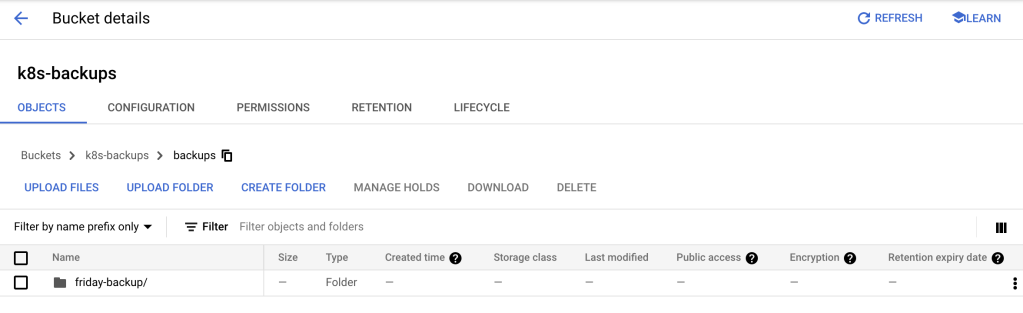
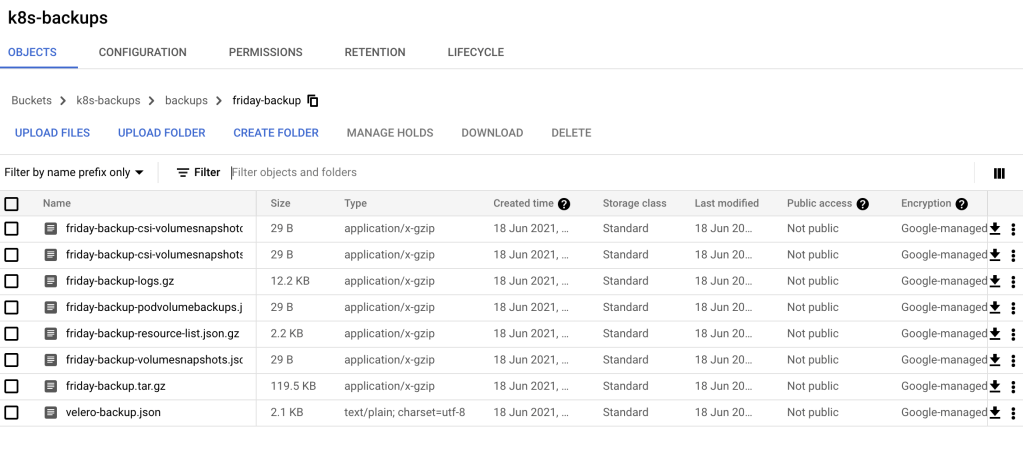
[root@localhost ~]# velero backup create friday-backup
Backup request "friday-backup" submitted successfully.
Run `velero backup describe friday-backup` or `velero backup logs friday-backup` for more details.


[root@localhost ~]# velero backup describe friday-backup
Name:         friday-backup
Namespace:    velero
Labels:       velero.io/storage-location=default
Annotations:  velero.io/source-cluster-k8s-gitversion=v1.19.1
              velero.io/source-cluster-k8s-major-version=1
              velero.io/source-cluster-k8s-minor-version=19

Phase:  Completed

Errors:    0
Warnings:  0

Namespaces:
  Included:  *
  Excluded:  <none>

Resources:
  Included:        *
  Excluded:        <none>
  Cluster-scoped:  auto

Label selector:  <none>

Storage Location:  default

Velero-Native Snapshot PVs:  auto

TTL:  720h0m0s

Hooks:  <none>

Backup Format Version:  1.1.0

Started:    2021-06-19 06:01:21 +0000 UTC
Completed:  2021-06-19 06:01:28 +0000 UTC

Expiration:  2021-07-19 06:01:21 +0000 UTC

Total items to be backed up:  325
Items backed up:              325

Velero-Native Snapshots: <none included>


[root@localhost ~]# velero backup logs friday-backup
time="2021-06-19T06:01:21Z" level=info msg="Setting up backup temp file" backup=velero/friday-backup logSource="pkg/controller/backup_controller.go:534"
time="2021-06-19T06:01:21Z" level=info msg="Setting up plugin manager" backup=velero/friday-backup logSource="pkg/controller/backup_controller.go:541"
time="2021-06-19T06:01:21Z" level=info msg="Getting backup item actions" backup=velero/friday-backup logSource="pkg/controller/backup_controller.go:545"
time="2021-06-19T06:01:21Z" level=info msg="Setting up backup store to check for backup existence" backup=velero/friday-backup logSource="pkg/controller/backup_controller.go:551"
time="2021-06-19T06:01:22Z" level=info msg="Writing backup version file" backup=velero/friday-backup logSource="pkg/backup/backup.go:236"
time="2021-06-19T06:01:22Z" level=info msg="Including namespaces: *" backup=velero/friday-backup logSource="pkg/backup/backup.go:242"
time="2021-06-19T06:01:22Z" level=info msg="Excluding namespaces: <none>" backup=velero/friday-backup logSource="pkg/backup/backup.go:243"
time="2021-06-19T06:01:22Z" level=info msg="Including resources: *" backup=velero/friday-backup logSource="pkg/backup/backup.go:246"
time="2021-06-19T06:01:22Z" level=info msg="Excluding resources: <none>" backup=velero/friday-backup logSource="pkg/backup/backup.go:247"
time="2021-06-19T06:01:22Z" level=info msg="Backing up all pod volumes using restic: false" backup=velero/friday-backup logSource="pkg/backup/backup.go:248"
time="2021-06-19T06:01:22Z" level=info msg="Getting items for group" backup=velero/friday-backup group=v1 logSource="pkg/backup/item_collector.go:76"
time="2021-06-19T06:01:22Z" level=info msg="Getting items for resource" backup=velero/friday-backup group=v1 logSource="pkg/backup/item_collector.go:165" resource=pods
time="2021-06-19T06:01:22Z" level=info msg="Listing items" backup=velero/friday-backup group=v1 logSource="pkg/backup/item_collector.go:291" namespace= resource=pods
time="2021-06-19T06:01:22Z" level=info msg="Retrieved 10 items" backup=velero/friday-backup group=v1 logSource="pkg/backup/item_collector.go:297" namespace= resource=pods
time="2021-06-19T06:01:22Z" level=info msg="Getting items for resource" backup=velero/friday-backup group=v1 logSource="pkg/backup/item_collector.go:165" resource=persistentvolumeclaims
Restore procedure
[root@localhost kubernetes]# kubectl create ns test-restore
namespace/test-restore created


[root@localhost kubernetes]# kubectl config set-context --current  --namespace=test-restore
Context "kind-velero" modified.


[root@localhost kubernetes]#  kubectl apply -f deployments/deployment.yaml
deployment.apps/example-deploy created


[root@localhost kubernetes]# kubectl get po
NAME                              READY   STATUS    RESTARTS   AGE
example-deploy-7765698dd7-dslp5   1/1     Running   0          37s
example-deploy-7765698dd7-rrd8r   1/1     Running   0          37s


[root@localhost kubernetes]# velero backup create test-restore-namespace-backup --include-namespaces test-restore
Backup request "test-restore-namespace-backup" submitted successfully.
Run `velero backup describe test-restore-namespace-backup` or `velero backup logs test-restore-namespace-backup` for more details.


[root@localhost kubernetes]# kubectl delete ns test-restore
namespace "test-restore" deleted


[root@localhost kubernetes]# kubectl get ns
NAME                 STATUS   AGE
default              Active   11h
kube-node-lease      Active   11h
kube-public          Active   11h
kube-system          Active   11h
local-path-storage   Active   11h
velero               Active   8h


[root@localhost kubernetes]# velero backup get
NAME                            STATUS      ERRORS   WARNINGS   CREATED                         EXPIRES   STORAGE LOCATION   SELECTOR
default-namespace-backup        Completed   0        0          2021-06-19 06:36:54 +0000 UTC   29d       default            <none>
friday-backup                   Completed   0        0          2021-06-19 06:01:21 +0000 UTC   29d       default            <none>
test-restore-namespace-backup   Completed   0        0          2021-06-19 06:53:13 +0000 UTC   29d       default            <none>


[root@localhost kubernetes]# velero restore create restore-version --from-backup test-restore-namespace-backup
Restore request "restore-version" submitted successfully.
Run `velero restore describe restore-version` or `velero restore logs restore-version` for more details.

[root@localhost kubernetes]# kubectl get ns
NAME                 STATUS   AGE
default              Active   11h
kube-node-lease      Active   11h
kube-public          Active   11h
kube-system          Active   11h
local-path-storage   Active   11h
test-restore         Active   12s
velero               Active   8h


[root@localhost kubernetes]# velero restore describe restore-version
Name:         restore-version
Namespace:    velero
Labels:       <none>
Annotations:  <none>

Phase:  Completed

Started:    2021-06-19 06:57:31 +0000 UTC
Completed:  2021-06-19 06:57:33 +0000 UTC

Backup:  test-restore-namespace-backup

Namespaces:
  Included:  all namespaces found in the backup
  Excluded:  <none>

Resources:
  Included:        *
  Excluded:        nodes, events, events.events.k8s.io, backups.velero.io, restores.velero.io, resticrepositories.velero.io
  Cluster-scoped:  auto

Namespace mappings:  <none>

Label selector:  <none>

Restore PVs:  auto


[root@localhost kubernetes]# kubectl get all -n test-restore
NAME                                  READY   STATUS    RESTARTS   AGE
pod/example-deploy-7765698dd7-dslp5   1/1     Running   0          32s
pod/example-deploy-7765698dd7-rrd8r   1/1     Running   0          32s

NAME                             READY   UP-TO-DATE   AVAILABLE   AGE
deployment.apps/example-deploy   2/2     2            2           32s

NAME                                        DESIRED   CURRENT   READY   AGE
replicaset.apps/example-deploy-7765698dd7   2         2         2       32s


There will be restore folder in the same bucket

[root@localhost ~]# gsutil ls gs://k8s-backups/
gs://k8s-backups/backups/
gs://k8s-backups/restores/


