A Project Object Model or POM is the fundamental unit of work in Maven.
It is an XML file that contains information about the project and configuration details used by Maven to build the project.
Minimal POM
The minimum requirement for a POM are the following:
- project root
- modelVersion – should be set to 4.0.0
- groupId – the id of the project’s group.
- artifactId – the id of the artifact (project)
- version – the version of the artifact under the specified group
- <project>
- <modelVersion>4.0.0</modelVersion>
- <groupId>com.mycompany.app</groupId>
- <artifactId>my-app</artifactId>
- <version>1</version>
- </project>
A POM requires that its groupId, artifactId, and version be configured. These three values form the project’s fully qualified artifact name.
This is in the form of <groupId>:<artifactId>:<version>.
EX: “com.mycompany.app:my-app:1”
Cleanup commands
|
mvn clean
|
Delete target folder in the project including submodule’s ones
|
Compile commands
|
mvn clean compile
|
Compile all code without running any test
|
|
mvn clean test
|
Compile source code and test code and executes Unit Test
|
|
mvn clean package
|
Compile source code and test code, executes unit test, if all tests pass, it package compiled code in output archive
|
|
mvn clean verify
|
Compile source/test code, executes unit test, package compiled code and then executes Integration tests
|
Deploy commands
|
mvn clean install
|
Executes full compile steps and, if all test are succesful, deploy the resulting artifact into local maven repository
|
|
mvn clean deploy
|
Executes full compile steps and, if all test are succesful, deploy the resulting artifact into local maven repository and deploy to remote maven repository if configured
|
Resolution commands
|
mvn dependency:tree
|
Resolves and displays the dependency tree for this project including subomdules
|
|
mvn help:effective-pom
|
Resolves and display the full pom hierarcy and displays it as a single pom
|
Additional options
|
-U
|
Re-evaluate SNAPSHOTS depenencies. If a newer snapshot is found on the repository it wull be re-downloded. Uneffective for stables versions
|
|
-Dmaven.test.skip=true
|
Skip test execution phase
|
|
-skipTests
|
Alias for -Dmaven.test.skip=true
|
|
-P${PROFILENAME}
|
Run the maven build with ${PROFILENAME} profile
|
|
-o
|
Offline mode, run the build as if no network connection is available
|
|
-pl ${MODULE1},${MODULE2}
|
Run the build just on the given list of submodule. It can be a comma separated list of submodules directory or groupsId:artifactId values
|
|
-s ${SETTINGS_XML_FILE}
|
Provides an alternative file for local settings. Default settings file is ~/.m2/settings.xml
|
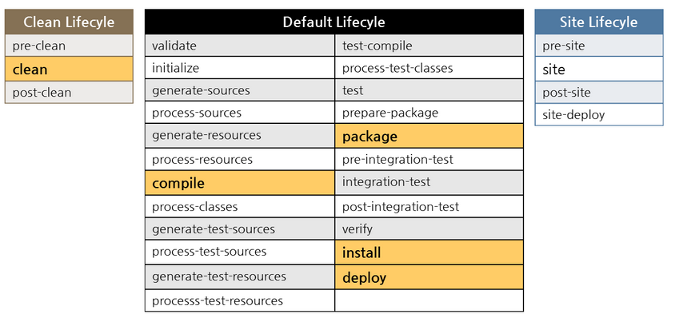
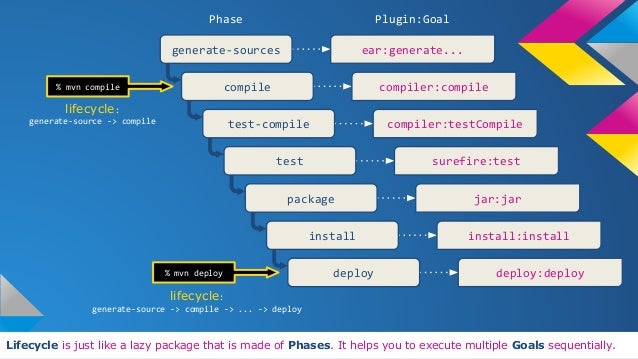
Maven Lifecycle
|
Clean Lifecycle
|
Default Lifecycle
|
Site Lifecycle
|
|
|
pre-clean
|
validate
|
test-compile
|
pre-site
|
|
clean
|
initialize
|
process-test-classes
|
site
|
|
post-clean
|
generate-sources
|
test
|
post-site
|
|
process-sources
|
prepare-package
|
site-deploy
|
|
|
generate-resources
|
package
|
||
|
process-resources
|
pre-integration-test
|
||
|
compile
|
integration-test
|
||
|
process-classes
|
post-integration-test
|
||
|
generate-test-sources
|
verify
|
||
|
process-test-sources
|
install
|
||
|
generate-test-resources
|
deploy
|
||
|
process-test-resources
|
|||
Creating a new Project (jar)
mvn archetype:create -DgroupId=Artifact Group -DartifactId=Artifact ID
Example: mvn archetype:create -DgroupId=de.focusdv.bcs -DartifactId=new-app
Note: Creates a new Project Directory new-app with package structure de.focusdv.bcs. Name of the packaged jar will be new-app-version.jar
Creating a new Project (war)
mvn archetype:create -DgroupId=Artifact Group -DartifactId=Artifact ID -DarchetypeArtifactId=maven-archetype-webapp
Example:
mvn archetype:create -DgroupId=de.focusdv.bcs -DartifactId=new-webapp -DarchetypeArtifactId=maven-archetype-webapp
Note: Creates a new Directory new-webapp with package structure de.focusdv.bcs. Name of the packaged war will be new-app-version.war
Standard Project Structure
| /new-app/pom.xml | maven2 project file |
| /new-app/src/ | Sources |
| /new-app/src/main/java/ | Java source tree |
| /new-app/src/test/java/ | Java unit tests |
| /new-app/src/main/resources/ | Java classpath resources |
| /new-app/src/test/resources/ | Resources for unit-tests |
| /new-app/target/classes/ | compiles classes |
| /new-app/target/test-classes/ | compiles test classes |
| /new-app/target/dots | other plugins’ output |
| /newwebapp/src/main/webapp | root of webapp |
Compiling
mvn compile
Running Unit Tests / Code Coverage
mvn test
compiles and runs unit tests
mvn clean cobertura:cobertura
Packaging (jar, war)
mvn clean package
Installing Artifact in Local Repository
mvn clean install
Installing 3rdParty jar in local Repository
mvn install:install-file -Dfile=foo.jar
-DgroupId=org.foosoft -DartifactId=foo
-Dversion=1.2.3 -Dpackaging=jar
Cleaning Up
mvn clean
Creating Eclipse Project Structure
mvn eclipse:eclipse
Maven Project file (pom.xml)
Minimal pom.xml is created with
mvn archetype:create
Installing Artifact in Remote Repository
mvn clean deploy
Install 3rdParty jar to Remote Repository
mvn deploy:deploy-file -DgroupId=commons-collections
-DartifactId=collections-generic -Dversion=4.0
-Dpackaging=jar -Dfile=collections-generic-4.0.jar
-DrepositoryId=focus-repository
-Durl=scp://host/home/mvn/public_html/repository
Preparing Releases
Make sure, the SCM settings in the POM are correct and all changes are committed to the SCM.
Then execute
mvn -Dusername=USER -Dpassword=PASS release:prepare
Performing Releases
mvn -P profile -Drelease:perform